Nimbus builds websites for small businesses in Lakewood Ranch, Sarasota and Bradenton. Show customers what you do, give them a reason to choose you, and make calling or requesting a quote straightforward on a phone.
Start with a $300 single-page website, a $650 Starter site or a $1,250 Business site. We agree the pages, writing, photos and revisions before work begins. If your existing website can do the job with a focused repair, we will explain that option too.
A page structure chosen around your customers and the agreed package size
Readable page content available without waiting for interactive features to load
A descriptive title, search description and preferred address for each page
A sitemap generated from the site's own route table, so it cannot drift out of date
Business information that matches the public details you approve
Responsive images sized for the device, so a phone doesn't download a desktop photo
Call and email links; Starter and Business also include a contact form tested for delivery
An automated check of page metadata, sitemap coverage and internal links before publication
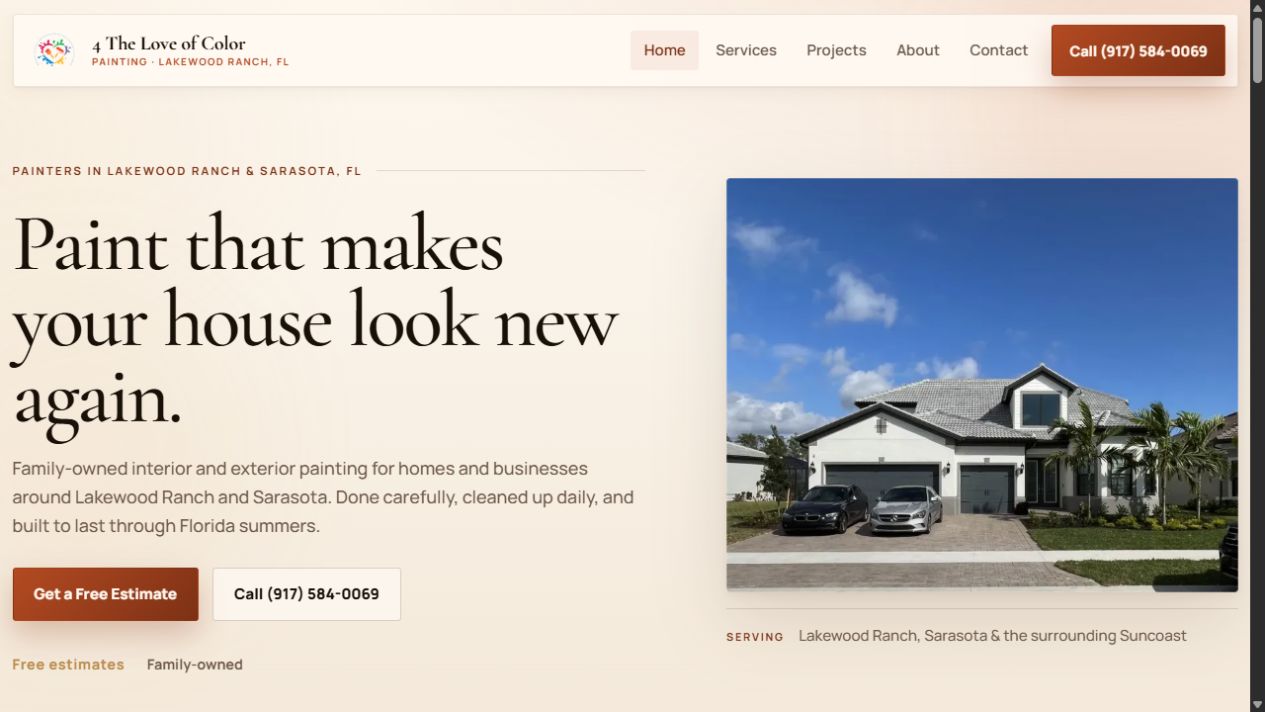
A website built for a local painting business
4 The Love of Color Painting
Our family business’s website brings its painting services, real project photos and estimate request together. The case study explains the work and the checks behind it.
Its multi-page scope is an example of a larger build. Your package determines the pages and features included.
We look at customer questions, your existing search data when available and the local results for your services. That helps us choose clear wording and useful page topics. A page can appear for several related searches; it does not need a separate version for every phrase.
Choose the right amount of website
A single page can suit a simple business with one clear offer. Separate service or project pages help when customers need more detail. We choose within your package's page allowance and quote additions before building them.
Write the pages before designing them
Design that comes first produces boxes that copy then has to be squeezed into, which is how sites end up padded with filler. Writing first means the layout is shaped around what there is to say, and it surfaces the pages that turn out to have nothing behind them — better to find that now than after they're built.
Build it as static HTML
The main words, links and page details are included in the website files before they reach the visitor. Google can process JavaScript, but pre-rendered content reduces dependence on that processing and works for crawlers that cannot run it. Loading speed still depends on the whole page, including images and interactive features.
Gate the whole thing behind an automated check
Automated checks cover page titles and descriptions, preferred URLs, headings, image descriptions, structured data, sitemap coverage and internal links. Blocking errors stop publication; suggestions are reviewed in context. We separately check the layout and agreed contact actions before launch.
Hand over something you can run
You get the repository, the domain configuration, and a documented deploy. Nothing is locked to a proprietary builder or a monthly platform fee, and nobody has to ask permission to change a phone number.
What people usually arrive with
“We have a website but we never get calls from it”
We first separate visibility from inquiries: are people finding the site, and can they understand the offer and contact you? Search data, mobile usability, your services, reputation and competition all help identify the next useful change.
“It looks fine on my laptop”
We check the layout and contact actions on a phone as well as a computer. Large photos, scripts and hosting can all affect loading. We measure the page before choosing what to reduce or change.
“We're on page four and we don't know why”
We check whether Google has indexed the relevant page, which queries show it and what customers see in competing results. Technical errors are one possibility; useful content, business reputation and competition also matter. A sitemap or title change alone does not guarantee a higher position.
“Our old developer disappeared”
A common and genuinely difficult position, especially when the domain, hosting and site are spread across accounts nobody has the logins for. Recovering control of the domain is the first priority, because everything else can be rebuilt and that cannot.
Common questions
Do I need a new website, or can the one I have be fixed?
We review the existing site first. Broken links, slow photos or unclear content may call for a focused repair. A single-page site can be a good fit for a simple offer. A rebuild makes sense when the changes you need exceed what the current site can reasonably support.
How long does a small business site take?
It depends almost entirely on how quickly the content comes together, not on the build. The technical work is predictable; waiting on photos, service descriptions and decisions is what stretches timelines. Sites where the owner has their material ready move dramatically faster.
Will I be able to update it myself?
You receive the site files after full payment and can have another developer change them. These packages do not include a visual editing dashboard. Optional care covers small changes; a content editor can be quoted separately if you need one.
What do you need from me to start?
A list of what you sell, anything you already know about what customers ask you, photos of real work if you have them, and access to your domain. Real project photos matter more than most people expect — they're the part a competitor can't copy.
A useful contractor website explains the work you do, where you work, shows real project evidence and makes requesting an estimate easy. Check those basics before paying for more pages or advertising.
Start with a site:yourdomain.com search, then confirm individual pages in Search Console. Search results are a useful spot check, but they are not a complete inventory of indexed pages.
Ask who owns the domain, who owns the site if you stop paying, and what happens if the designer disappears. Those three answers tell you more than any portfolio.
In most cases it's images — full-size photos sent to phone screens. It's also usually the cheapest thing on the site to fix, and it's the most common reason a page fails Google's speed thresholds on mobile.
If you want to know where your current site actually stands before spending anything, ask and I'll go through it and tell you what I find — including when the honest answer is that it doesn't need replacing.
Send over your domain and you'll get back a specific list of what's working and what isn't — including when the honest answer is that nothing needs replacing.